BeautyPlus
AI-Powered Portrait & Creative Suite for Professional-Grade Mobile Photography.

Professional video editing redefined through Apple Silicon optimization and AI-driven workflows.

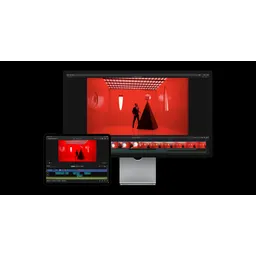
Final Cut Pro represents the pinnacle of Apple's professional creative suite, specifically engineered to exploit the hardware-software synergy of Apple Silicon. In 2026, the platform stands out as a market leader by integrating deep neural network processing for tasks like automated object tracking, voice isolation, and smart conform aspect ratio management. Its architecture is built around the Magnetic Timeline, a non-destructive, trackless metadata-driven approach that eliminates sync issues common in traditional NLEs. The 2026 ecosystem supports fluid workflows between macOS and iPadOS, utilizing the Apple Neural Engine to handle 8K ProRes RAW streams with zero-proxy latency. With the expansion of Apple Vision Pro, Final Cut Pro has evolved to be the primary hub for Spatial Video editing, allowing creators to manipulate 3D depth and immersion natively. The software remains a one-time purchase on Mac, providing a high-value alternative to subscription-based models, while the iPad version offers a flexible entry point for mobile-first creators. Its technical foundation leverages the Metal graphics API for real-time rendering and FCPXML for deep integration with third-party asset management and color grading pipelines.
Final Cut Pro represents the pinnacle of Apple's professional creative suite, specifically engineered to exploit the hardware-software synergy of Apple Silicon.
Explore all tools that specialize in hdr color grading. This domain focus ensures Final Cut Pro delivers optimized results for this specific requirement.
A metadata-driven timeline that automatically collapses gaps and prevents clip collisions.
Uses the Apple Neural Engine to track faces and objects in 2D and 3D space with one click.
Native support for stereoscopic 3D video captured on iPhone 15 Pro/Vision Pro.
Machine learning algorithm that identifies and isolates human speech from complex noise floors.
Direct manipulation of camera sensor data with hardware acceleration on Apple Silicon.
Automatically analyzes clips and reframes them for vertical or square aspect ratios.
Internal API that allows third-party services like Frame.io and Shutterstock to run inside the UI.
Download and install Final Cut Pro via the Mac App Store or iPad App Store.
Initialize a new Library (the master database for your media and projects).
Import media using the Media Import window, choosing to 'Leave Files in Place' or 'Copy to Library'.
Create a New Project and select resolution (up to 8K) and color space (SDR or HDR).
Drag clips to the Magnetic Timeline, utilizing the 'P' (Position) or 'A' (Select) tools.
Use the 'Object Tracker' to analyze and attach titles or effects to moving elements.
Apply 'Voice Isolation' via the Audio Inspector to eliminate background noise using AI.
Perform color correction using the Color Inspector's Wheels, Curves, and Hue/Saturation tools.
Add motion graphics using native titles or integrated Motion templates.
Export using 'Share' presets or send to Compressor for advanced encoding options.
All Set
Ready to go
Verified feedback from other users.
"Highly praised for speed and stability on Mac, though some professional editors still prefer traditional track-based timelines for complex audio work."
Post questions, share tips, and help other users.

AI-Powered Portrait & Creative Suite for Professional-Grade Mobile Photography.

The all-in-one creative platform for AI-powered photo editing, collage making, and graphic design.

Professional-grade AI background removal for high-fidelity image and video processing.

Professional AI-powered background removal and object manipulation for high-fidelity digital assets.

Create professional, aesthetically balanced logos and complete brand identities using advanced generative design.

Professional-grade stop-motion animation studio for tactile storytelling and STEAM education.