
Sweet Home 3D
Free interior design application for drawing house plans in 2D and 3D.
16d ago
Best for General AI
PricingFree
Free
2D Plan Creation
3D Visualization
Furniture Arrangement
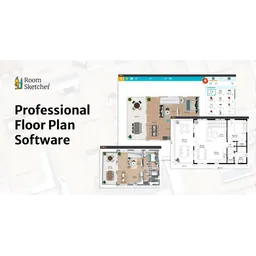
Create accurate floor plans quickly and easily.
Create accurate floor plans quickly and easily.
RoomSketcher is a user-friendly floor plan software designed to create, customize, and visualize floor plans. It supports multiple creation methods including scanning with an iPhone or iPad, drawing from scratch, uploading sketches for redrawing, tracing existing plans, and AI-powered conversion of floor plans. The software offers 2D and 3D floor plans, 3D photos, Live 3D walkthroughs, and 360 Views. Users can personalize floor plans with custom colors, materials, and letterheads. The RoomSketcher App is available on Mac, Windows, iPad, and Android tablets, with cloud storage ensuring projects are accessible across devices. It is suited for real estate, interior design, and home improvement projects, offering features like measurements, branding, and collaboration tools.
Create accurate floor plans quickly and easily.
Quick visual proof for RoomSketcher. Helps non-technical users understand the interface faster.

RoomSketcher is a user-friendly floor plan software designed to create, customize, and visualize floor plans.
Explore all tools that specialize in space planning. This domain focus ensures RoomSketcher delivers optimized results for this specific requirement.
Open side-by-side comparison first, then move to deeper alternatives guidance.
Uses AI to automatically convert uploaded sketches or images into accurate floor plans, saving time and effort.
Allows users to virtually walk through the floor plan in 3D, providing a realistic sense of space and design.
Generates interactive 3D panoramas of the floor plan that can be easily shared and embedded on websites.
Enables users to customize floor plans with their preferred colors, materials, and letterheads, maintaining brand consistency.
Supports multiple users working on the same project, streamlining the design process and improving team efficiency.
Allows users to easily replace materials in the 3D model to visualize different design options.
1. Download and install the RoomSketcher App on your preferred device (Mac, Windows, iPad, or Android tablet).
2. Sign up for a free account to access basic features and explore the user interface.
3. Choose a floor plan creation method: scan a room, draw from scratch, upload a sketch, trace an existing plan, or convert a floor plan using AI.
4. Use the drag-and-drop functionality to add walls, doors, windows, and furniture to your floor plan.
5. Customize the floor plan with your preferred colors, materials, and measurements.
6. Generate 2D and 3D visualizations to preview your design.
7. Explore advanced features such as 3D Photos, Live 3D walkthroughs, and 360 Views.
8. Save your project to the cloud and access it on any device.
9. Share your floor plan with clients or collaborators for feedback and approval.
10. Upgrade to a paid subscription for more powerful features and monthly credits.
All Set
Ready to go
Verified feedback from other users.
“RoomSketcher is praised for its user-friendliness and professional-quality output, but some users find the pricing for advanced features to be a limitation.”
No reviews yet. Be the first to rate this tool.
Free interior design application for drawing house plans in 2D and 3D.

Uncover and optimize your SaaS investment.

A powerful shell designed for interactive use and scripting.

Zopto was a LinkedIn automation tool designed to generate leads, but it is now defunct.

The all-in-one AI platform for go-to-market teams.

Maximize your Amazon sales and grow your business with powerful, accurate data and AI-driven listing optimization.